0
Total Registered Devices
0
In Process / Under Repair
0
Quality Testing Phase
0
Ready for Pickup (Done)
0
Software Solutions
0
Hardware Repairs
Rs. 0
Pending Receivables
Rs. 0
Total Business Volume
Shop Counter & Direct Sale POS Live
Direct counter sale for Charging Cables, Pouches, Mobile Batteries, Chargers & Accessories with WhatsApp digital receipt
Active & In-Progress Repairs Active Jobs Only
Completed & delivered devices are automatically moved to All Repair Records
| Device ID | Customer Details | Device & Category | Status & Tech | Estimate & Balance | Actions |
|---|
All Repair Records & Devices
Complete workshop repair ledger categorized by device stage and status
| Device ID | Customer Info | Device Details | Status & Tech | Total & Balance | Actions |
|---|
Customers & Client Directory
Complete database of registered customers, intake history, linked repair tickets, and direct WhatsApp communication.
0
Total Customers
0
Repeat Clients
0
Linked Repair Jobs
0
WhatsApp Contacts
| Customer ID | Customer Name | Mobile / WhatsApp | City / Address | Repair Tickets | Last Visit | Actions |
|---|
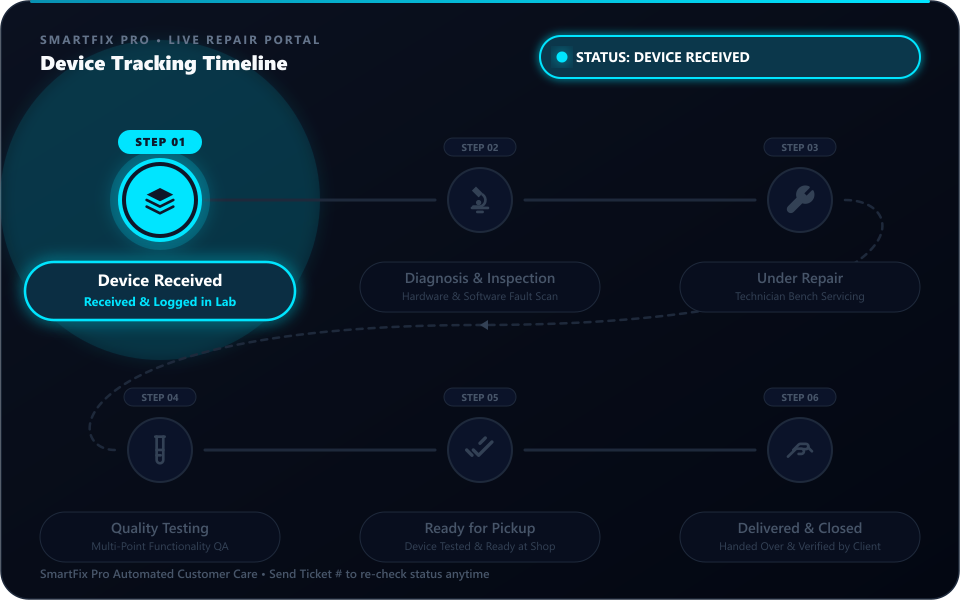
Mobile Repair Live Status Tracker
Enter your Device ID (e.g. 1001) or registered Mobile Number to track progress in real-time
Service Technicians & Lab Workload
Manage repair specialists, active bench workload, skill specializations, and WhatsApp bot portal access.
0
Total Technicians
0
Active Bench Repairs
0
Available for Work
0
WhatsApp Bot Portal
0
Total Catalog Items
0
Units in Stock
Rs. 0
Inventory Valuation
0
Low Stock Reorder Alerts
Spare Parts & Software Tool Credits
Stock, Cost Management & WhatsApp Sharing| Photo | Item / Component Name | Category | Cost Price | Selling Price | Profit Margin | Current Stock | Actions |
|---|
0
Shop Retail Items
0
Retail Units in Stock
Rs. 0
Stock Inventory Value
0
Low Stock Warnings
Shop Items & Accessories Inventory
Retail stock for Charging Cables, Pouches, Batteries, Chargers, Protectors & Counter Sales| Photo | Item / Accessory Name | Category | Cost Price | Selling Price | Profit Margin | Current Stock | Actions |
|---|
Faults Library & Assessment Options
Manage Predefined Mobile Fault Descriptions for Quick Repair Job Intake| # | Fault Description / Issue Name | Category | Actions |
|---|
SmartFix Pro Settings Hub
تمام تر سیٹنگز کو منظم کیا گیا ہے۔ بنیادی سسٹم معلومات نیچے ایڈٹ کریں یا متعلقہ گیٹ وے کارڈ پر کلک کریں۔
System Title & Core Shop Profile (سسٹم نام اور بنیادی معلومات)
یہاں سے آپ سسٹم کا ٹائٹل ("SmartFix Pro")، دکان کا نام، رابطہ نمبر، پتہ اور کرنسی براہ راست تبدیل کر سکتے ہیں۔
QR & Gateway Link
واٹس ایپ کنکشن و پیئرنگConnect WhatsApp via QR scan or 8-digit phone pairing code. Real-time session monitoring.
Shop Profile & Brand
شاپ نام و برانڈ پروفائلShop name, tagline, official helpline, address, greeting, operating hours, and receipt terms.
Customer Bot Menu
انٹرایکٹو چیٹ فلو مینوManage interactive customer menu options (Tracking, Rates, Hours, Staff Contact) & buttons.
Status Messages Customizer
اسٹیٹس الرٹس کسٹمائزرEdit customer WhatsApp status alerts for 6 stages + cancelled with dynamic variable chips & live preview.
Technician Automation
ٹیکنیشن الرٹس و کمانڈزTechnician intake alert lines toggle, privacy mode (hide phone), live alert preview & WhatsApp commands.
Plugins & Webhooks
پلگ انز و اینڈ پوائنٹسToggle OpenWA plugins (FAQ bot, after-hours, etc.) and copy production inbound webhook and REST URLs.
Backup & Restore
ڈیٹا بیس بیک اپ و ری اسٹورDownload JSON full database backups, restore previous database snapshots, or reset test data.
Chats (0)
WhatsApp Bot & Gateway Settings
Connect your real WhatsApp account via QR scan or phone pairing, manage auto-reply plugins, and configure webhooks.
Official WhatsApp Multi-Device Gateway
Connect your real WhatsApp account to activate 24/7 automated customer repair tracking.
Open WhatsApp on your phone
Open the official WhatsApp application on your Android or iPhone device.
Navigate to Linked Devices
Tap Menu ⋮ (Android top-right) or Settings ⚙️ (iPhone bottom-right) > tap Linked Devices.
Tap "Link a Device" and Scan
Point your mobile camera at this screen to capture the QR code. Your session will authenticate immediately.
Prefer linking without camera?
Click the "Link with Phone Number" tab above to connect using an 8-character pairing code.
Shop Profile & WhatsApp Brand Settings
Business details, claim receipts, and WhatsApp message headers
- WhatsApp Messages: Shop name aur helpline har automated status alert aur auto-reply ke header/footer me use hoti hai.
- Printed Claim Receipts: Shop name, address, phone aur terms printed slips par print hoti hain.
- Live Tracking Portal: Customer live status check karte waqt aapki dukan ka naam dekhta hai.
Interactive Chat-Flow Menu Manager
Add, edit, modify, or remove WhatsApp menu buttons
Customer WhatsApp Status Message Templates (اسٹیٹس میسجز کسٹمائزر)
کسٹمر کو اسٹیٹس تبدیلی پر جانے والے تمام خودکار واٹس ایپ میسجز کو اپنی مرضی سے ایڈٹ اور کسٹمائز کریں
Technician Alert Message Customizer
Enable/disable lines sent when assigning devices
Technician WhatsApp Menu Manager
Manage, modify, or add new technician functions
Installed OpenWA Plugins
Toggle switch to enable/disableProduction Webhook & Endpoints
When deploying this web application on a live VPS or cloud domain, configure your WhatsApp gateway with these endpoints:
Database Backup & Restore (JSON)
Your entire database (repair tickets, technicians, inventory, settings) is stored locally in your browser's persistent storage. Export a JSON backup to keep your data safe or transfer to another PC.
User Accounts & Roles Management
Manage employee logins, staff roles, and granular security permissions
1
Total Accounts
1
Administrators
0
Technicians
0
Front Desk / Staff
| User / Staff Name | Username | Role & Permissions | Contact Phone | Account Status | Last Login | Actions |
|---|